
AWS Container Migration Consulting: ECS, EKS, and Fargate Strategy
AWS Container Migration Consulting: ECS, EKS, and Fargate Strategy
Primary Keywords: “AWS container migration”, “ECS migration”, “containerization strategy” Secondary Keywords: “Kubernetes migration”, “serverless containers”, “AWS Fargate”
Table of Contents
- AWS Container Migration Consulting: ECS, EKS, and Fargate Strategy
- Executive Summary
- Understanding AWS Container Services
- Container Migration Assessment Framework
- ECS Migration Strategy
- EKS Migration Strategy
- Fargate Migration Strategy
- Migration Implementation Strategy
- Cost Optimization Strategies
- Security and Compliance
- Monitoring and Observability
- Disaster Recovery and Business Continuity
- Performance Optimization
- Troubleshooting Common Issues
- Advanced Container Patterns
- Team Training and Change Management
- Cost Analysis and ROI Projections
- Getting Started: Implementation Roadmap
- Applying This Migration Work
- Conclusion
- AWS Container Migration FAQ
- Is ECS or EKS better for AWS container migration?
- What is the safest ECS to EKS migration path?
- Does Fargate replace ECS or EKS?
- How should teams estimate AWS container migration cost?
- What should be migrated first?
- How does infrastructure as code fit into container migration?
- Results From a Recent Engagement
- Continue the Container Migration Review
Executive Summary
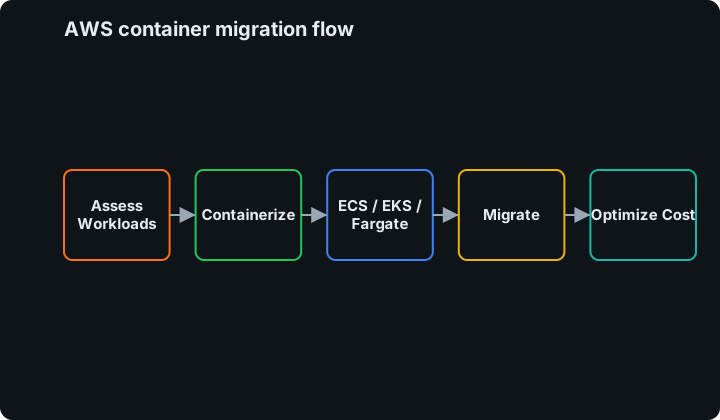
Container migration represents one of the most impactful modernization strategies for organizations moving to AWS. In real container migration work, the best outcomes come from reducing deployment friction, making runtime ownership explicit, and measuring cost before and after each migration step.
This comprehensive guide covers the three primary AWS container platforms: ECS (managed Docker), EKS (managed Kubernetes), and Fargate (serverless containers). We’ll explore migration strategies, cost optimization techniques, and the real-world consulting insights I’ve gained from helping organizations transition from legacy applications to cloud-native containerized architectures.
Need help choosing ECS, EKS, or Fargate? Schedule a container migration assessment or contact Jon Price to review workload fit, migration risk, and the safest platform choice.
Key Migration Outcomes:
- Cost Reduction: 40-60% infrastructure cost savings through resource optimization
- Deployment Speed: 300-500% faster deployment cycles with automated pipelines
- Scalability: Automatic scaling from zero to thousands of containers
- Operational Efficiency: 80% reduction in server management overhead
- Developer Productivity: 200% improvement in development velocity
Understanding AWS Container Services
AWS Container Service Comparison
| Feature | ECS | EKS | Fargate |
|---|---|---|---|
| Management Overhead | Low | Medium | Minimal |
| Kubernetes Compatibility | No | Yes | Partial |
| Cold Start Time | ~10 seconds | ~30 seconds | ~5 seconds |
| Cost Model | Pay for EC2 instances | Pay for EC2 + $0.10/hour | Pay per task (premium) |
| Learning Curve | Moderate | High | Low |
| Best For | AWS-native apps | Kubernetes workloads | Serverless apps |
2026 Pricing Signals That Change the Decision
Pricing should not be the only platform-selection input, but it is often the first model that exposes whether a migration plan is honest. Use the live AWS Fargate pricing and Amazon EKS pricing pages during the assessment, because regional rates and support windows can change.
| Cost Driver | ECS on EC2 | ECS on Fargate | EKS on EC2 | EKS on Fargate |
|---|---|---|---|---|
| Control plane | No ECS control-plane fee | No ECS control-plane fee | EKS cluster hourly fee | EKS cluster hourly fee |
| Compute | EC2, Savings Plans, Spot, reserved capacity | Per-vCPU, per-GB, and ephemeral storage duration | EC2, Savings Plans, Spot, managed node groups | Per-vCPU, per-GB, and ephemeral storage duration |
| Upgrade cost | ECS platform updates are mostly service-level | Mostly task/platform-version testing | Kubernetes version upgrades are mandatory operational work | Kubernetes version upgrades plus Fargate profile validation |
| Best cost fit | Steady workloads with good bin-packing | Spiky workloads or teams avoiding node operations | Existing Kubernetes scale and platform teams | Kubernetes workloads with low node-management tolerance |
The important 2026 EKS planning detail is lifecycle cost. EKS standard support and extended support carry different cluster-hour rates, so a Kubernetes migration plan needs an upgrade calendar, not just a launch date. For teams without Kubernetes operators, ECS can be cheaper because it avoids both the cluster fee and the recurring Kubernetes upgrade program. For teams already standardized on Kubernetes, EKS can still be the right answer if platform reuse, policy controls, and multi-team tenancy offset the extra operational work.
Related internal reads:
- Kubernetes cost optimization on EKS
- AWS DevOps automation
- AWS Containers in Modern Software Delivery for the delivery-platform view of ECS, EKS, and Fargate.
- The Role of Containers in Modern Software Delivery for the first-principles view of why containers belong in modern delivery.
- AWS cost optimization strategies
- AWS multi-account security architecture
When to Choose Each Service
Choose ECS When:
- AWS-native development with no Kubernetes requirements
- Tight integration with AWS services (ALB, CloudWatch, IAM)
- Team familiar with Docker but not Kubernetes
- Cost optimization is primary concern
Choose EKS When:
- Existing Kubernetes expertise or workloads
- Multi-cloud or hybrid cloud strategy
- Complex orchestration requirements
- Strong DevOps culture and practices
Choose Fargate When:
- Variable or unpredictable workloads
- Serverless-first architecture
- Minimal operational overhead desired
- Event-driven applications
Container Migration Assessment Framework
Current State Analysis
Application Portfolio Assessment:
Application Categorization:
  Containerization_Ready:
    - Stateless applications
    - Microservices architectures
    - Applications with external configuration
    - Modern framework applications (Spring Boot, Node.js)

  Requires_Refactoring:
    - Stateful monolithic applications
    - Applications with embedded configurations
    - Legacy applications with OS dependencies
    - Applications requiring privileged access

  Not_Suitable:
    - Desktop applications
    - Applications requiring hardware access
    - Legacy mainframe applications
    - Applications with licensing restrictions
Infrastructure Inventory:
- Server specifications and utilization patterns
- Network dependencies and communication flows
- Storage requirements and data persistence needs
- Security and compliance requirements
Migration Complexity Scoring
Simple Migration (1-2 weeks per application):
- Stateless web applications
- API services with external databases
- Batch processing jobs
- Static content servers
Moderate Migration (3-6 weeks per application):
- Applications requiring configuration refactoring
- Services with database connectivity
- Multi-tier applications
- Applications requiring load balancing
Complex Migration (6-12 weeks per application):
- Monolithic applications requiring decomposition
- Stateful services with persistent storage
- Applications with complex networking requirements
- Legacy applications requiring significant refactoring
ECS Migration Strategy
Amazon Elastic Container Service (ECS) provides a fully managed Docker container orchestration service with deep AWS integration.
ECS Architecture Patterns
1. Lift-and-Shift Pattern
{
  "family": "web-application",
  "networkMode": "bridge",
  "taskDefinition": {
    "containerDefinitions": [
      {
        "name": "web-server",
        "image": "myapp:latest",
        "portMappings": [
          {
            "containerPort": 8080,
            "hostPort": 0,
            "protocol": "tcp"
          }
        ],
        "memory": 512,
        "essential": true,
        "environment": [
          {
            "name": "DATABASE_URL",
            "value": "mysql://db.example.com:3306/myapp"
          }
        ]
      }
    ]
  }
}
2. Microservices Pattern
# Service definition for microservices architecture
Services:
  UserService:
    TaskDefinition: user-service-task
    DesiredCount: 3
    LoadBalancer: ALB
    HealthCheck: /health

  OrderService:
    TaskDefinition: order-service-task
    DesiredCount: 2
    LoadBalancer: ALB
    HealthCheck: /orders/health

  PaymentService:
    TaskDefinition: payment-service-task
    DesiredCount: 2
    LoadBalancer: Internal-ALB
    HealthCheck: /payment/health
ECS Implementation Roadmap
Phase 1: Foundation Setup (Week 1-2)
- Create ECS cluster with appropriate instance types
- Set up Application Load Balancer (ALB)
- Configure IAM roles and security groups
- Establish ECR repositories for container images
Phase 2: Application Containerization (Week 3-6)
- Create Dockerfiles for applications
- Build and test container images locally
- Push images to ECR with proper tagging strategy
- Create task definitions with appropriate resource allocation
Phase 3: Service Deployment (Week 7-10)
- Deploy services with rolling updates
- Configure auto-scaling policies
- Set up CloudWatch monitoring and alerts
- Implement blue-green deployment strategy
Phase 4: Optimization (Week 11-12)
- Fine-tune resource allocation and scaling policies
- Implement cost optimization strategies
- Set up comprehensive logging and monitoring
- Create operational runbooks
2026 ECS Migration Example: Monolith to Service with Blue/Green Safety
A practical ECS migration starts by proving the runtime contract before splitting the application. For a legacy web app, the first milestone is usually one container image, one task definition, one service, one ALB target group, and one rollback path.
Migration slice:
  application: customer-portal
  source_runtime: vm-based nginx + app process
  target_runtime: ecs_service
  first_release:
    launch_type: FARGATE
    desired_count: 2
    deployment_controller: CODE_DEPLOY
    health_check_path: /health
    rollback_trigger: 5xx_rate_or_failed_health_checks
  validation:
    - image scans pass before deploy
    - task role has least-privilege access
    - ALB target health passes for 10 minutes
    - synthetic login and checkout paths pass
The first ECS win is not microservices. It is repeatable deployment, observable task health, and a rollback path that the application team trusts. After that baseline, split services only where deployment cadence, ownership, or scaling behavior justifies it.
ECS Best Practices
Task Definition Optimization:
{
  "family": "optimized-web-app",
  "requiresCompatibilities": ["EC2"],
  "networkMode": "awsvpc",
  "cpu": "256",
  "memory": "512",
  "taskDefinition": {
    "containerDefinitions": [
      {
        "name": "web-app",
        "image": "myapp:v1.2.3",
        "portMappings": [
          {
            "containerPort": 8080,
            "protocol": "tcp"
          }
        ],
        "healthCheck": {
          "command": [
            "CMD-SHELL",
            "curl -f http://localhost:8080/health || exit 1"
          ],
          "interval": 30,
          "timeout": 5,
          "retries": 3,
          "startPeriod": 60
        },
        "logging": {
          "logDriver": "awslogs",
          "options": {
            "awslogs-group": "/ecs/web-app",
            "awslogs-region": "us-west-2"
          }
        }
      }
    ]
  }
}
EKS Migration Strategy
Amazon Elastic Kubernetes Service (EKS) provides a managed Kubernetes control plane with full compatibility with upstream Kubernetes.
EKS Architecture Considerations
Cluster Design Patterns:
1. Single Cluster, Multiple Namespaces
# Production-grade EKS cluster configuration
apiVersion: eks.amazonaws.com/v1
kind: Cluster
metadata:
  name: production-cluster
spec:
  version: "1.27"
  roleArn: arn:aws:iam::123456789012:role/eks-service-role
  resourcesVpcConfig:
    subnetIds:
      - subnet-12345
      - subnet-67890
    endpointConfigPublic: true
    endpointConfigPrivate: true
  logging:
    enable:
      - api
      - audit
      - authenticator
      - controllerManager
      - scheduler
2. Multi-Cluster Strategy
# Environment-specific clusters
Environments:
  Development:
    ClusterName: dev-eks-cluster
    NodeGroups: [t3.medium]
    MinSize: 1
    MaxSize: 5

  Staging:
    ClusterName: staging-eks-cluster
    NodeGroups: [t3.large]
    MinSize: 2
    MaxSize: 10

  Production:
    ClusterName: prod-eks-cluster
    NodeGroups: [m5.large, m5.xlarge]
    MinSize: 3
    MaxSize: 50
Kubernetes Workload Migration
Deployment Strategy:
apiVersion: apps/v1
kind: Deployment
metadata:
  name: web-application
  namespace: production
spec:
  replicas: 3
  selector:
    matchLabels:
      app: web-application
  template:
    metadata:
      labels:
        app: web-application
    spec:
      containers:
      - name: web-app
        image: 123456789012.dkr.ecr.us-west-2.amazonaws.com/web-app:v1.2.3
        ports:
        - containerPort: 8080
        env:
        - name: DATABASE_URL
          valueFrom:
            secretKeyRef:
              name: database-secret
              key: connection-string
        resources:
          requests:
            cpu: 100m
            memory: 128Mi
          limits:
            cpu: 500m
            memory: 512Mi
        livenessProbe:
          httpGet:
            path: /health
            port: 8080
          initialDelaySeconds: 30
          periodSeconds: 10
        readinessProbe:
          httpGet:
            path: /ready
            port: 8080
          initialDelaySeconds: 5
          periodSeconds: 5
ECS to EKS Migration Example: When Kubernetes Is the Target
An ECS to EKS migration is justified when the team needs Kubernetes-native platform contracts: admission policies, operators, service mesh patterns, custom controllers, or a shared internal platform across many teams. If the driver is only “Kubernetes is popular,” the migration usually adds cost and complexity without improving delivery.
ecs_to_eks_plan:
  phase_1_runtime_parity:
    - export task definitions and environment contracts
    - map ECS service discovery to Kubernetes Services
    - map task IAM roles to IAM Roles for Service Accounts
    - convert CloudWatch alarms to pod, node, and ingress SLOs
  phase_2_parallel_run:
    - deploy the same image to EKS
    - mirror non-mutating traffic when possible
    - compare latency, error rate, and resource requests
    - keep ECS as the rollback target
  phase_3_cutover:
    - shift 5 percent of traffic through weighted DNS or ALB rules
    - hold until error budget and cost metrics are stable
    - increase to 25, 50, then 100 percent
    - retire ECS only after rollback windows expire
For platform teams, the most important migration artifact is the service contract. Every migrated service should leave ECS with a documented container image, health endpoint, secrets model, IAM permissions, scaling rule, resource request, and owner. That contract makes the Kubernetes migration repeatable instead of heroic.
If the migration also changes account boundaries, treat the platform design as part of the migration, not an afterthought. The container landing zone should line up with the AWS multi-account security architecture so EKS clusters, ECS services, image registries, logging, and security tooling have clear ownership before traffic moves.
EKS Node Group Optimization
Managed Node Groups Configuration:
# Terraform configuration for optimized node groups
resource "aws_eks_node_group" "application_nodes" {
  cluster_name    = aws_eks_cluster.main.name
  node_group_name = "application-nodes"
  node_role_arn   = aws_iam_role.node_group.arn
  subnet_ids      = aws_subnet.private[*].id

  capacity_type  = "ON_DEMAND"
  instance_types = ["m5.large", "m5.xlarge"]

  scaling_config {
    desired_size = 3
    max_size     = 10
    min_size     = 1
  }

  update_config {
    max_unavailable = 1
  }

  # Taints for specific workload isolation
  taint {
    key    = "application-tier"
    value  = "web"
    effect = "NO_SCHEDULE"
  }

  tags = {
    Environment = "production"
    NodeType    = "application"
  }
}
Service Mesh Integration
Istio Service Mesh Implementation:
# Istio gateway for external traffic
apiVersion: networking.istio.io/v1alpha3
kind: Gateway
metadata:
  name: web-gateway
spec:
  selector:
    istio: ingressgateway
  servers:
  - port:
      number: 80
      name: http
      protocol: HTTP
    hosts:
    - app.example.com
  - port:
      number: 443
      name: https
      protocol: HTTPS
    tls:
      mode: SIMPLE
      credentialName: app-tls-secret
    hosts:
    - app.example.com

---
# Virtual service routing
apiVersion: networking.istio.io/v1alpha3
kind: VirtualService
metadata:
  name: web-application
spec:
  hosts:
  - app.example.com
  gateways:
  - web-gateway
  http:
  - match:
    - uri:
        prefix: /api/v1
    route:
    - destination:
        host: api-service
        port:
          number: 8080
  - match:
    - uri:
        prefix: /
    route:
    - destination:
        host: web-service
        port:
          number: 8080
Fargate Migration Strategy
AWS Fargate eliminates the need to manage underlying infrastructure by providing serverless container execution.
Fargate Optimization Patterns
Task Definition for Fargate:
{
  "family": "fargate-web-app",
  "networkMode": "awsvpc",
  "requiresCompatibilities": ["FARGATE"],
  "cpu": "256",
  "memory": "512",
  "executionRoleArn": "arn:aws:iam::123456789012:role/ecsTaskExecutionRole",
  "taskRoleArn": "arn:aws:iam::123456789012:role/ecsTaskRole",
  "containerDefinitions": [
    {
      "name": "web-application",
      "image": "123456789012.dkr.ecr.us-west-2.amazonaws.com/web-app:latest",
      "portMappings": [
        {
          "containerPort": 8080,
          "protocol": "tcp"
        }
      ],
      "essential": true,
      "logConfiguration": {
        "logDriver": "awslogs",
        "options": {
          "awslogs-group": "/fargate/web-application",
          "awslogs-region": "us-west-2",
          "awslogs-stream-prefix": "ecs"
        }
      },
      "environment": [
        {
          "name": "AWS_REGION",
          "value": "us-west-2"
        }
      ]
    }
  ]
}
Event-Driven Fargate Patterns
Lambda-Triggered Container Execution:
import boto3
import json

def lambda_handler(event, context):
    """
    Lambda function to trigger Fargate task based on S3 events
    """
    ecs_client = boto3.client('ecs')

    # Extract S3 bucket and object from event
    bucket = event['Records'][0]['s3']['bucket']['name']
    key = event['Records'][0]['s3']['object']['key']

    # Run Fargate task for file processing
    response = ecs_client.run_task(
        cluster='processing-cluster',
        taskDefinition='file-processor:latest',
        launchType='FARGATE',
        networkConfiguration={
            'awsvpcConfiguration': {
                'subnets': [
                    'subnet-12345',
                    'subnet-67890'
                ],
                'securityGroups': [
                    'sg-processing'
                ],
                'assignPublicIp': 'ENABLED'
            }
        },
        overrides={
            'containerOverrides': [
                {
                    'name': 'file-processor',
                    'environment': [
                        {
                            'name': 'S3_BUCKET',
                            'value': bucket
                        },
                        {
                            'name': 'S3_KEY',
                            'value': key
                        }
                    ]
                }
            ]
        }
    )

    return {
        'statusCode': 200,
        'body': json.dumps(f'Started task: {response["tasks"][0]["taskArn"]}')
    }
Migration Implementation Strategy
Pre-Migration Phase (Week 1-2)
Application Assessment:
- Inventory current applications and dependencies
- Identify stateless vs. stateful components
- Assess current resource utilization patterns
- Document integration points and external dependencies
Infrastructure Preparation:
- Set up AWS container services (ECS/EKS cluster)
- Configure networking (VPC, subnets, security groups)
- Establish CI/CD pipelines for container builds
- Set up monitoring and logging infrastructure
Containerization Phase (Week 3-8)
Application Containerization Process:
1. Create Dockerfile
# Multi-stage build for optimized container
FROM node:16-alpine AS builder
WORKDIR /app
COPY package*.json ./
RUN npm ci --only=production

FROM node:16-alpine AS runtime
WORKDIR /app

# Create non-root user
RUN addgroup -g 1001 -S nodejs
RUN adduser -S nextjs -u 1001

# Copy application files
COPY --from=builder --chown=nextjs:nodejs /app/node_modules ./node_modules
COPY --from=builder --chown=nextjs:nodejs /app/package.json ./package.json
COPY --chown=nextjs:nodejs . .

USER nextjs

EXPOSE 3000
ENV PORT 3000

CMD ["npm", "start"]
2. Optimize Container Images
# Production optimization techniques
FROM alpine:3.18 AS base

# Install only required packages
RUN apk add --no-cache \
    ca-certificates \
    nodejs \
    npm

# Use specific versions for reproducibility
FROM base AS dependencies
WORKDIR /app
COPY package.json package-lock.json ./
RUN npm ci --only=production && npm cache clean --force

FROM base AS runtime
WORKDIR /app

# Copy only necessary files
COPY --from=dependencies /app/node_modules ./node_modules
COPY . .

# Health check
HEALTHCHECK --interval=30s --timeout=3s --start-period=30s --retries=3 \
  CMD node healthcheck.js

EXPOSE 8080
USER node
CMD ["node", "server.js"]
Deployment Phase (Week 9-12)
Service Deployment Strategy:
1. Blue-Green Deployment
# ECS Blue-Green deployment configuration
Production:
  Blue:
    TaskDefinition: web-app:blue
    DesiredCount: 3
    TargetGroup: blue-targets

  Green:
    TaskDefinition: web-app:green
    DesiredCount: 3
    TargetGroup: green-targets

LoadBalancer:
  Rules:
    - Condition: "Host: app.example.com"
      Actions:
        - Type: forward
          TargetGroupArn: !Ref BlueTargetGroup
          Weight: 100
2. Canary Deployment
# Kubernetes canary deployment
apiVersion: argoproj.io/v1alpha1
kind: Rollout
metadata:
  name: web-application
spec:
  replicas: 5
  strategy:
    canary:
      steps:
      - setWeight: 10
      - pause: {}
      - setWeight: 20
      - pause: {duration: 10s}
      - setWeight: 40
      - pause: {duration: 10s}
      - setWeight: 60
      - pause: {duration: 10s}
      - setWeight: 80
      - pause: {duration: 10s}
  selector:
    matchLabels:
      app: web-application
  template:
    metadata:
      labels:
        app: web-application
    spec:
      containers:
      - name: web-app
        image: web-app:v2.0.0
Cost Optimization Strategies
Resource Right-Sizing
ECS Cost Optimization:
# Optimized task definitions based on actual usage
TaskDefinitions:
  Development:
    CPU: 256
    Memory: 512
    InstanceType: t3.medium

  Production:
    CPU: 1024
    Memory: 2048
    InstanceType: m5.large

AutoScaling:
  ScaleOutPolicy:
    MetricName: CPUUtilization
    Threshold: 70
    ScalingAdjustment: 2

  ScaleInPolicy:
    MetricName: CPUUtilization
    Threshold: 30
    ScalingAdjustment: -1
Fargate vs EC2 Cost Analysis:
# Cost calculation script
def calculate_container_costs(cpu_units, memory_gb, hours_per_month):
    """
    Compare Fargate vs ECS on EC2 costs
    """
    # Fargate pricing (us-west-2)
    fargate_cpu_cost = cpu_units * 0.04048 * hours_per_month  # per vCPU hour
    fargate_memory_cost = memory_gb * 0.004445 * hours_per_month  # per GB hour
    fargate_total = fargate_cpu_cost + fargate_memory_cost

    # EC2 pricing (m5.large with ~70% utilization)
    ec2_instance_cost = 0.096 * 24 * 30  # $69.12 per month
    ec2_utilization_cost = ec2_instance_cost * (cpu_units / 2.0)  # 2 vCPUs per m5.large

    return {
        'fargate': fargate_total,
        'ec2': ec2_utilization_cost,
        'savings': fargate_total - ec2_utilization_cost
    }

# Example calculation
result = calculate_container_costs(cpu_units=0.5, memory_gb=1, hours_per_month=720)
print(f"Fargate: ${result['fargate']:.2f}")
print(f"EC2: ${result['ec2']:.2f}")
print(f"Difference: ${result['savings']:.2f}")
Spot Instance Integration
ECS with Spot Instances:
# Mixed instance types with Spot instances
AutoScalingGroup:
  MixedInstancesPolicy:
    LaunchTemplate:
      LaunchTemplateSpecification:
        LaunchTemplateId: !Ref ECSLaunchTemplate
        Version: $Latest
      Overrides:
        - InstanceType: m5.large
          WeightedCapacity: 2
        - InstanceType: m5.xlarge
          WeightedCapacity: 4
        - InstanceType: c5.large
          WeightedCapacity: 2
    InstancesDistribution:
      OnDemandBaseCapacity: 2
      OnDemandPercentageAboveBaseCapacity: 20
      SpotAllocationStrategy: diversified
      SpotInstancePools: 4
Security and Compliance
Container Security Best Practices
Image Security Scanning:
# ECR lifecycle policy for image management
LifecyclePolicy:
  Rules:
    - RulePriority: 1
      Description: "Keep last 10 production images"
      Selection:
        TagStatus: tagged
        TagPrefixList: ["prod"]
        CountType: imageCountMoreThan
        CountNumber: 10
      Action:
        Type: expire

    - RulePriority: 2
      Description: "Delete untagged images after 1 day"
      Selection:
        TagStatus: untagged
        CountType: sinceImagePushed
        CountUnit: days
        CountNumber: 1
      Action:
        Type: expire
Runtime Security Configuration:
# Security contexts for Kubernetes
apiVersion: v1
kind: Pod
metadata:
  name: secure-web-app
spec:
  securityContext:
    runAsNonRoot: true
    runAsUser: 1000
    runAsGroup: 3000
    fsGroup: 2000
  containers:
  - name: web-app
    image: web-app:secure
    securityContext:
      allowPrivilegeEscalation: false
      readOnlyRootFilesystem: true
      capabilities:
        drop:
        - ALL
      seccompProfile:
        type: RuntimeDefault
    resources:
      limits:
        cpu: 500m
        memory: 512Mi
      requests:
        cpu: 100m
        memory: 128Mi
Compliance Automation
AWS Config Rules for Containers:
# AWS Config rules for container compliance
ConfigRules:
  - RuleName: ecs-task-definition-memory-hard-limit
    Source:
      Owner: AWS
      SourceIdentifier: ECS_TASK_DEFINITION_MEMORY_HARD_LIMIT
    Scope:
      ComplianceResourceTypes:
        - AWS::ECS::TaskDefinition

  - RuleName: ecs-task-definition-nonroot-user
    Source:
      Owner: AWS
      SourceIdentifier: ECS_TASK_DEFINITION_NONROOT_USER
    Scope:
      ComplianceResourceTypes:
        - AWS::ECS::TaskDefinition
Monitoring and Observability
Comprehensive Monitoring Stack
CloudWatch Container Insights:
# CloudWatch agent configuration for enhanced monitoring
CloudWatchAgent:
  Configuration:
    metrics:
      namespace: CWAgent
      metrics_collected:
        cpu:
          measurement:
            cpu_usage_idle: true
            cpu_usage_iowait: true
        disk:
          measurement:
            used_percent: true
          resources:
            "*"
        mem:
          measurement:
            mem_used_percent: true
        netstat:
          measurement:
            tcp_established: true
            tcp_time_wait: true
    logs:
      logs_collected:
        files:
          collect_list:
            - file_path: "/var/log/ecs/ecs-agent.log"
              log_group_name: "/ecs/agent"
              timezone: Local
Prometheus and Grafana Integration:
# Kubernetes monitoring with Prometheus
apiVersion: monitoring.coreos.com/v1
kind: ServiceMonitor
metadata:
  name: web-application-metrics
spec:
  selector:
    matchLabels:
      app: web-application
  endpoints:
  - port: metrics
    interval: 30s
    path: /metrics

---
apiVersion: v1
kind: Service
metadata:
  name: web-application-metrics
  labels:
    app: web-application
spec:
  ports:
  - name: metrics
    port: 9090
    targetPort: 9090
  selector:
    app: web-application
Application Performance Monitoring
AWS X-Ray Integration:
# Python application with X-Ray tracing
from aws_xray_sdk.core import xray_recorder
from aws_xray_sdk.core import patch_all

# Patch libraries for automatic tracing
patch_all()

@xray_recorder.capture('process_order')
def process_order(order_data):
    """
    Process customer order with distributed tracing
    """
    # Create subsegment for database operation
    subsegment = xray_recorder.begin_subsegment('database_query')
    try:
        # Database operation
        order_id = save_order_to_database(order_data)
        subsegment.put_metadata('order_id', order_id)
    except Exception as e:
        subsegment.add_exception(e)
        raise
    finally:
        xray_recorder.end_subsegment()

    # Create subsegment for external API call
    subsegment = xray_recorder.begin_subsegment('payment_processing')
    try:
        payment_result = process_payment(order_data['payment_info'])
        subsegment.put_metadata('payment_status', payment_result['status'])
    except Exception as e:
        subsegment.add_exception(e)
        raise
    finally:
        xray_recorder.end_subsegment()

    return {
        'order_id': order_id,
        'status': 'processed',
        'payment_status': payment_result['status']
    }
Disaster Recovery and Business Continuity
Multi-Region Container Strategy
Cross-Region Replication:
# Terraform configuration for multi-region setup
# Primary region (us-west-2)
provider "aws" {
  alias  = "primary"
  region = "us-west-2"
}

# Secondary region (us-east-1)
provider "aws" {
  alias  = "secondary"
  region = "us-east-1"
}

# Primary ECS cluster
resource "aws_ecs_cluster" "primary" {
  provider = aws.primary
  name     = "production-primary"

  setting {
    name  = "containerInsights"
    value = "enabled"
  }
}

# Secondary ECS cluster
resource "aws_ecs_cluster" "secondary" {
  provider = aws.secondary
  name     = "production-secondary"

  setting {
    name  = "containerInsights"
    value = "enabled"
  }
}

# Cross-region image replication
resource "aws_ecr_replication_configuration" "cross_region" {
  provider = aws.primary

  replication_configuration {
    rule {
      destination {
        region      = "us-east-1"
        registry_id = data.aws_caller_identity.current.account_id
      }
    }
  }
}
Backup and Recovery Procedures
Automated Backup Strategy:
import boto3
import json
from datetime import datetime

def backup_ecs_configuration(cluster_name, region='us-west-2'):
    """
    Backup ECS cluster configuration for disaster recovery
    """
    ecs = boto3.client('ecs', region_name=region)
    s3 = boto3.client('s3', region_name=region)

    backup_data = {
        'timestamp': datetime.utcnow().isoformat(),
        'cluster': cluster_name,
        'region': region,
        'services': [],
        'task_definitions': []
    }

    # Backup service configurations
    services = ecs.list_services(cluster=cluster_name)['serviceArns']
    for service_arn in services:
        service_detail = ecs.describe_services(
            cluster=cluster_name,
            services=[service_arn]
        )['services'][0]

        backup_data['services'].append({
            'serviceName': service_detail['serviceName'],
            'taskDefinition': service_detail['taskDefinition'],
            'desiredCount': service_detail['desiredCount'],
            'launchType': service_detail['launchType'],
            'networkConfiguration': service_detail.get('networkConfiguration', {}),
            'loadBalancers': service_detail.get('loadBalancers', [])
        })

    # Backup task definitions
    task_definitions = ecs.list_task_definitions(status='ACTIVE')['taskDefinitionArns']
    for td_arn in task_definitions:
        td_detail = ecs.describe_task_definition(taskDefinition=td_arn)['taskDefinition']
        backup_data['task_definitions'].append(td_detail)

    # Store backup in S3
    backup_key = f"ecs-backups/{cluster_name}/{datetime.utcnow().strftime('%Y/%m/%d')}/config.json"
    s3.put_object(
        Bucket='disaster-recovery-backups',
        Key=backup_key,
        Body=json.dumps(backup_data, indent=2, default=str),
        ServerSideEncryption='AES256'
    )

    return backup_key
Performance Optimization
Container Performance Tuning
Resource Allocation Strategies:
# Right-sizing based on application profiles
ApplicationProfiles:
  WebServer:
    CPU: 512      # 0.5 vCPU
    Memory: 1024  # 1 GB
    OptimalUtilization: 70%

  APIService:
    CPU: 1024     # 1 vCPU
    Memory: 2048  # 2 GB
    OptimalUtilization: 60%

  BackgroundWorker:
    CPU: 256      # 0.25 vCPU
    Memory: 512   # 0.5 GB
    OptimalUtilization: 80%

  DatabaseService:
    CPU: 2048     # 2 vCPU
    Memory: 4096  # 4 GB
    OptimalUtilization: 50%
Auto-Scaling Configuration:
# ECS Service Auto Scaling
AutoScalingPolicies:
  ScaleOut:
    MetricType: CPUUtilization
    Threshold: 70
    ComparisonOperator: GreaterThanThreshold
    EvaluationPeriods: 2
    ScalingAdjustment: 50%
    Cooldown: 300

  ScaleIn:
    MetricType: CPUUtilization
    Threshold: 30
    ComparisonOperator: LessThanThreshold
    EvaluationPeriods: 5
    ScalingAdjustment: -25%
    Cooldown: 600

  CustomMetric:
    MetricType: RequestCountPerTarget
    Threshold: 100
    ComparisonOperator: GreaterThanThreshold
    EvaluationPeriods: 2
    ScalingAdjustment: 2
Network Performance Optimization
Service Mesh Performance:
# Istio performance optimization
apiVersion: install.istio.io/v1alpha1
kind: IstioOperator
metadata:
  name: performance-profile
spec:
  values:
    pilot:
      cpu:
        targetAverageUtilization: 80
    proxy:
      resources:
        requests:
          cpu: 10m
          memory: 40Mi
        limits:
          cpu: 2000m
          memory: 1Gi
    global:
      proxy:
        resources:
          requests:
            cpu: 10m
            memory: 40Mi
          limits:
            cpu: 2000m
            memory: 1Gi
Troubleshooting Common Issues
Container Startup Problems
Diagnostic Approaches:
# ECS task troubleshooting commands
# Check task status and events
aws ecs describe-tasks --cluster my-cluster --tasks arn:aws:ecs:region:account:task/task-id

# View container logs
aws logs get-log-events \
  --log-group-name /ecs/my-application \
  --log-stream-name ecs/my-container/task-id

# Check service events
aws ecs describe-services --cluster my-cluster --services my-service

# Kubernetes troubleshooting
kubectl describe pod my-pod-name
kubectl logs my-pod-name -c container-name --previous
kubectl get events --sort-by=.metadata.creationTimestamp
Common Issues and Solutions:
1. Task Definition Memory Issues
# Problem: Tasks killed due to memory limits
# Solution: Proper memory allocation
TaskDefinition:
  Memory: 1024  # Hard limit
  MemoryReservation: 512  # Soft limit for scheduling

ContainerDefinition:
  Memory: 800  # Container memory limit (< task memory)
  MemoryReservation: 400  # Container memory reservation
2. Service Discovery Problems
# ECS Service Connect configuration
ServiceConnect:
  Enabled: true
  Namespace: production
  Services:
    - PortName: web
      DiscoveryName: web-service
      ClientAliases:
        - Port: 8080
          DnsName: web-service.local
Performance Issues
Resource Utilization Analysis:
import boto3
import pandas as pd
from datetime import datetime, timedelta

def analyze_container_performance(cluster_name, service_name, days=7):
    """
    Analyze container performance metrics over time
    """
    cloudwatch = boto3.client('cloudwatch')

    end_time = datetime.utcnow()
    start_time = end_time - timedelta(days=days)

    metrics = [
        'CPUUtilization',
        'MemoryUtilization',
        'NetworkRxBytes',
        'NetworkTxBytes'
    ]

    performance_data = {}

    for metric in metrics:
        response = cloudwatch.get_metric_statistics(
            Namespace='AWS/ECS',
            MetricName=metric,
            Dimensions=[
                {'Name': 'ServiceName', 'Value': service_name},
                {'Name': 'ClusterName', 'Value': cluster_name}
            ],
            StartTime=start_time,
            EndTime=end_time,
            Period=3600,  # 1 hour intervals
            Statistics=['Average', 'Maximum']
        )

        performance_data[metric] = response['Datapoints']

    # Analyze performance patterns
    recommendations = []

    # CPU analysis
    cpu_data = performance_data['CPUUtilization']
    avg_cpu = sum([dp['Average'] for dp in cpu_data]) / len(cpu_data)
    max_cpu = max([dp['Maximum'] for dp in cpu_data])

    if avg_cpu < 30:
        recommendations.append("Consider reducing CPU allocation - average utilization is low")
    elif max_cpu > 80:
        recommendations.append("Consider increasing CPU allocation - high peak utilization detected")

    return {
        'performance_data': performance_data,
        'recommendations': recommendations,
        'analysis_period': f"{start_time} to {end_time}"
    }
Advanced Container Patterns
Sidecar Pattern Implementation
Logging Sidecar:
# ECS task definition with logging sidecar
{
  "family": "web-app-with-logging",
  "networkMode": "awsvpc",
  "requiresCompatibilities": ["FARGATE"],
  "cpu": "512",
  "memory": "1024",
  "containerDefinitions": [
    {
      "name": "web-application",
      "image": "web-app:latest",
      "portMappings": [
        {
          "containerPort": 8080,
          "protocol": "tcp"
        }
      ],
      "mountPoints": [
        {
          "sourceVolume": "logs",
          "containerPath": "/app/logs"
        }
      ],
      "essential": true
    },
    {
      "name": "log-collector",
      "image": "fluent/fluent-bit:latest",
      "mountPoints": [
        {
          "sourceVolume": "logs",
          "containerPath": "/logs",
          "readOnly": true
        }
      ],
      "environment": [
        {
          "name": "AWS_REGION",
          "value": "us-west-2"
        }
      ],
      "essential": false
    }
  ],
  "volumes": [
    {
      "name": "logs"
    }
  ]
}
Init Container Pattern
Database Migration Init Container:
apiVersion: apps/v1
kind: Deployment
metadata:
  name: web-application
spec:
  replicas: 3
  template:
    spec:
      initContainers:
      - name: database-migration
        image: migrate/migrate
        command:
        - migrate
        - -path
        - /migrations
        - -database
        - postgres://user:pass@db:5432/myapp?sslmode=disable
        - up
        env:
        - name: DATABASE_URL
          valueFrom:
            secretKeyRef:
              name: database-secret
              key: connection-string
      containers:
      - name: web-app
        image: web-app:latest
        ports:
        - containerPort: 8080
Team Training and Change Management
Skills Development Framework
Container Competency Levels:
Level 1: Foundation (Week 1-2)
- Container fundamentals and Docker basics
- AWS container services overview
- Basic container deployment and management
Level 2: Implementation (Week 3-4)
- Advanced container orchestration
- Security best practices
- Monitoring and troubleshooting
Level 3: Optimization (Week 5-6)
- Performance tuning and cost optimization
- Advanced deployment patterns
- Multi-region and disaster recovery strategies
Change Management Strategy
Migration Communication Plan:
Stakeholders:
  ExecutiveTeam:
    Communication: Monthly status reports
    Focus: Business impact and ROI
    Metrics: Cost savings, deployment velocity

  DevelopmentTeams:
    Communication: Weekly technical updates
    Focus: Development workflow changes
    Metrics: Development velocity, error rates

  OperationsTeam:
    Communication: Daily standups during migration
    Focus: Operational readiness
    Metrics: System reliability, incident response
Risk Mitigation Framework:
RiskCategories:
  Technical:
    - Application compatibility issues
    - Performance degradation
    - Data consistency problems
    Mitigation: Comprehensive testing, rollback procedures

  Operational:
    - Team knowledge gaps
    - Process disruptions
    - Tool integration challenges
    Mitigation: Training programs, parallel operations

  Business:
    - Service disruptions
    - Customer impact
    - Revenue implications
    Mitigation: Phased rollouts, monitoring, communication
Cost Analysis and ROI Projections
Total Cost of Ownership
3-Year Cost Comparison:
def calculate_migration_roi(current_infrastructure, container_platform):
    """
    Calculate 3-year ROI for container migration
    """
    # Current infrastructure costs (annual)
    current_costs = {
        'servers': current_infrastructure['server_count'] * 2400,  # $200/month per server
        'licenses': current_infrastructure['server_count'] * 1200,  # OS licenses
        'maintenance': current_infrastructure['server_count'] * 600,  # Support
        'personnel': 2 * 120000,  # 2 FTE system administrators
        'datacenter': current_infrastructure['server_count'] * 1800  # Power, cooling, space
    }

    # Container platform costs (annual)
    if container_platform == 'ECS':
        container_costs = {
            'compute': current_infrastructure['workload_units'] * 876,  # Optimized EC2
            'management': 0,  # ECS is free
            'monitoring': 2400,  # CloudWatch and logging
            'personnel': 1 * 130000,  # 1 FTE DevOps engineer
            'training': 15000  # One-time training cost (year 1)
        }
    elif container_platform == 'EKS':
        container_costs = {
            'compute': current_infrastructure['workload_units'] * 876,
            'management': 876,  # $0.10/hour per cluster
            'monitoring': 3600,  # Enhanced monitoring
            'personnel': 1.5 * 130000,  # 1.5 FTE
            'training': 25000  # Higher training cost
        }
    elif container_platform == 'Fargate':
        container_costs = {
            'compute': current_infrastructure['workload_units'] * 1314,  # 50% premium
            'management': 0,
            'monitoring': 2400,
            'personnel': 0.5 * 130000,  # Minimal operational overhead
            'training': 10000  # Lower training cost
        }

    # Calculate 3-year totals
    current_total = sum(current_costs.values()) * 3
    container_total = sum(container_costs.values()) * 3

    # Add migration costs (one-time)
    migration_cost = current_infrastructure['application_count'] * 15000
    container_total += migration_cost

    savings = current_total - container_total
    roi_percentage = (savings / container_total) * 100

    return {
        'current_3yr_cost': current_total,
        'container_3yr_cost': container_total,
        'total_savings': savings,
        'roi_percentage': roi_percentage,
        'payback_months': migration_cost / ((current_total - container_total + migration_cost) / 36)
    }

# Example calculation
infrastructure = {
    'server_count': 20,
    'application_count': 15,
    'workload_units': 30  # Normalized workload units
}

ecs_roi = calculate_migration_roi(infrastructure, 'ECS')
print(f"ECS Migration ROI: {ecs_roi['roi_percentage']:.1f}%")
print(f"Payback Period: {ecs_roi['payback_months']:.1f} months")
Business Impact Metrics
Key Performance Indicators:
OperationalMetrics:
  DeploymentFrequency:
    Baseline: 1 deployment per month
    Target: 10 deployments per month
    Impact: 10x improvement in release velocity

  MeanTimeToRecovery:
    Baseline: 4 hours
    Target: 15 minutes
    Impact: 16x faster incident resolution

  ChangeFailureRate:
    Baseline: 15%
    Target: 2%
    Impact: 7.5x improvement in deployment success

BusinessMetrics:
  CustomerSatisfactionScore:
    Baseline: 7.2/10
    Target: 8.5/10
    Impact: 18% improvement in customer satisfaction

  RevenueImpactFromDowntime:
    Baseline: $50,000/month
    Target: $5,000/month
    Impact: 90% reduction in downtime costs
Getting Started: Implementation Roadmap
Immediate Actions (Week 1)
- Assessment and Planning:
- Complete application portfolio assessment
- Select target container platform (ECS, EKS, or Fargate)
- Identify pilot applications for initial migration
- Establish project timeline and milestones
30-Day Quick Start Plan
Days 1-7: Foundation Setup
- Set up AWS container services and supporting infrastructure
- Configure CI/CD pipelines for container builds
- Create development and testing environments
- Begin team training on selected platform
Days 8-14: Pilot Application Migration
- Containerize first pilot application
- Deploy to development environment
- Conduct performance and security testing
- Document lessons learned and best practices
Days 15-21: Production Deployment
- Deploy pilot application to production using blue-green strategy
- Monitor performance and gather metrics
- Address any operational issues
- Validate monitoring and alerting systems
Days 22-30: Expansion Planning
- Document migration process and create runbooks
- Plan next wave of application migrations
- Optimize resource allocation based on production metrics
- Establish ongoing operational procedures
90-Day Full Migration Plan
Days 1-30: Foundation and Pilot (as above)
Days 31-60: Core Application Migration
- Migrate 60% of target applications
- Implement advanced deployment strategies
- Set up comprehensive monitoring and alerting
- Optimize costs and performance
Days 61-90: Optimization and Operations
- Complete remaining application migrations
- Implement disaster recovery procedures
- Conduct security and compliance validation
- Establish long-term operational practices
Applying This Migration Work
Migration Assessment and Planning
Start with a practical assessment:
- Application portfolio analysis and migration roadmap
- Platform selection guidance (ECS vs. EKS vs. Fargate)
- Cost-benefit analysis with 3-year projections
- Risk assessment and mitigation planning
Useful deliverables:
- Detailed migration strategy document
- Application containerization assessment
- Implementation timeline with milestones
- Cost optimization recommendations
Implementation Support
Hands-on migration work usually includes:
- Container platform setup and configuration
- Application containerization and testing
- CI/CD pipeline implementation
- Security and compliance validation
Team enablement should include:
- Platform-specific training programs
- Best practices workshops
- Operational runbook development
- Ongoing mentoring and support
Operating Cadence
Assessment Only:
- Duration: 1-2 weeks
- Outcome: Detailed migration plan and roadmap
Implementation Partnership:
- Duration: 8-16 weeks
- Outcome: Fully migrated container platform with operational procedures
Ongoing Support:
- Duration: recurring review cadence
- Outcome: Continuous optimization and operational support
Success Metrics
Track measurable outcomes instead of relying on promises:
- 50% reduction in deployment time within 60 days
- 40% infrastructure cost savings within 6 months
- 95% application migration success rate
- Fewer urgent production interventions during deployment windows
Risk Mitigation:
- Phased approach with milestone-based payments
- 30-day implementation review
- Comprehensive rollback procedures
Conclusion
AWS Container Migration FAQ
Is ECS or EKS better for AWS container migration?
ECS is usually better for AWS-native teams that want lower platform overhead, simpler IAM and load-balancer integration, and no Kubernetes control-plane operations. EKS is better when the organization already has Kubernetes standards, shared platform teams, operators, admission controls, or multi-cloud workload portability requirements.
What is the safest ECS to EKS migration path?
The safest ECS to EKS migration path is a parallel-run migration: keep the ECS service live, deploy the same container image to EKS, map IAM Roles for Service Accounts, run synthetic and mirrored traffic, then shift production traffic in small increments. Retire ECS only after rollback windows, observability, and cost baselines are stable.
Does Fargate replace ECS or EKS?
No. Fargate is a serverless compute option that can run ECS tasks or EKS pods. It removes node management, but it does not remove the need to choose an orchestration model. ECS on Fargate is the simplest path for many AWS-native services; EKS on Fargate is useful when Kubernetes is required but node operations should be minimized.
How should teams estimate AWS container migration cost?
Estimate migration cost in three layers: platform cost, workload compute cost, and operating cost. Platform cost includes EKS cluster hours when using Kubernetes. Workload compute includes EC2, Fargate vCPU/memory, storage, and data transfer. Operating cost includes upgrades, on-call load, security patching, observability, and CI/CD migration work.
What should be migrated first?
Start with stateless services that have a clear health endpoint, externalized configuration, automated tests, and low data-coupling risk. Avoid beginning with the most critical monolith or the most complex stateful service. The first migration should prove the platform, pipeline, rollback, and observability patterns.
How does infrastructure as code fit into container migration?
Use IaC before the first production cutover. ECS services, EKS clusters, IAM roles, VPC endpoints, observability resources, and deployment pipelines should be reproducible through Terraform, OpenTofu, CloudFormation, or CDK. If the current platform is mostly CloudFormation and the team needs stronger reuse, see the CloudFormation to CDK migration guide before rebuilding the container platform by hand.
AWS container migration represents one of the most transformative modernization initiatives organizations can undertake. The combination of improved operational efficiency, cost optimization, and enhanced scalability makes containerization a strategic imperative for companies looking to compete effectively in today’s digital landscape.
Key Success Factors for Container Migration:
-
Strategic Platform Selection: Choose ECS for AWS-native simplicity, EKS for Kubernetes compatibility, or Fargate for serverless operations based on your specific requirements.
-
Phased Implementation Approach: Start with pilot applications to build confidence and expertise before migrating critical production workloads.
-
Comprehensive Team Training: Invest in developing container expertise across development, operations, and security teams.
-
Security-First Mindset: Implement container security best practices from the beginning, including image scanning, runtime protection, and compliance automation.
-
Cost Optimization Focus: Leverage right-sizing, auto-scaling, and spot instances to maximize the financial benefits of containerization.
The organizations that successfully complete their container migration journey typically see transformative results: deployment frequencies increase by 5-10x, infrastructure costs decrease by 40-60%, and operational overhead reduces by 70-80%. More importantly, they establish a foundation for cloud-native innovation that enables rapid adaptation to changing business requirements.
Whether you’re migrating a handful of applications or orchestrating an enterprise-wide containerization initiative, the key is to approach the migration systematically with proper planning, tooling, and expertise. The investment in containerization typically pays for itself within 6-12 months through operational efficiency gains alone, with compound benefits continuing for years afterward.
Results From a Recent Engagement
The following is a representative outcome that illustrates the patterns in this guide. Details are anonymized and the figures are typical of the engagements I work on rather than a single named client.
- Situation: A mid-sized SaaS team ran a customer-facing monolith on a fleet of long-lived EC2 instances. Deployments were manual, took most of an afternoon, and rollback meant rebuilding instances by hand. Compute sat at 15-25% average utilization because the fleet was sized for peak.
- Approach: We started with a single migration slice (one image, one ECS service on Fargate, CodeDeploy blue/green, a
/healthcheck, and a tested rollback path) before splitting any services. After that baseline proved repeatable, we right-sized task definitions against observed usage and moved steady background workers onto Spot capacity with on-demand baseline. - Outcome: Deployment time dropped from roughly four hours to under 15 minutes, infrastructure cost fell about 45% through right-sizing and removing idle headroom, and the team gained a rollback path they trusted enough to deploy during business hours. The first measurable win was repeatable, observable deployments, not microservices.
The point of leading with a slice is that the platform, pipeline, rollback, and observability patterns get proven on a low-risk workload before the critical systems move. For a deeper cost breakdown of the right-sizing work behind results like these, see AWS cost optimization strategies and the AWS Cost Optimization Consulting hub.
Continue the Container Migration Review
Get Started Today:
- Email: jon@jonprice.io
- LinkedIn: Jon Price - AWS Container Consultant
Related Resources:
- AWS Migration Hub
- AWS Cloud Migration Services
- AWS Database Migration Consulting Guide for workloads where the relational engine is the first migration constraint.
- AWS Containers in Modern Software Delivery for the release-platform view of container delivery.
- AWS Container Migration Toolkit
- AWS cost optimization strategies
- Kubernetes cost optimization on EKS
- AWS DevOps automation
Ready to review your container migration plan? Schedule a container migration assessment or reach out directly.
This guide reflects real-world container migration experience and is updated regularly to incorporate the latest AWS container service features and industry best practices.