
Why I Built Yaah: I Needed to See What My AI Agents Were Actually Doing
I built Yaah because I got tired of guessing.
Once I started using AI agents across multiple repos, the work became hard to see. A chat transcript here, a branch there, a few tool calls buried in logs, some token usage in one place and model usage somewhere else. I could feel that AI was helping, but I could not answer basic operational questions without digging.
Which repos are getting the most AI work? Which models am I actually using? Are tokens going to useful tasks or just long context dumps? Which tools are slow or failing? If I am paying for subscriptions and usage-based APIs, am I getting value or just vibes?
Yaah is my answer to that. It is an operations dashboard for my AI agent usage.
The problem was not “AI can write code”
AI can write code. Sometimes it writes useful code. Sometimes it confidently writes nonsense. That part is not new anymore.
The problem I kept running into was visibility. Once agent usage spreads across projects, it starts looking like any other production-ish system. You need logs. You need metrics. You need enough history to spot patterns. You need a way to see cost and usage before you accidentally build a very expensive habit.
That is why Yaah looks more like an engineering dashboard than a chat UI. I wanted the operational layer around the agents, not another place to type prompts.
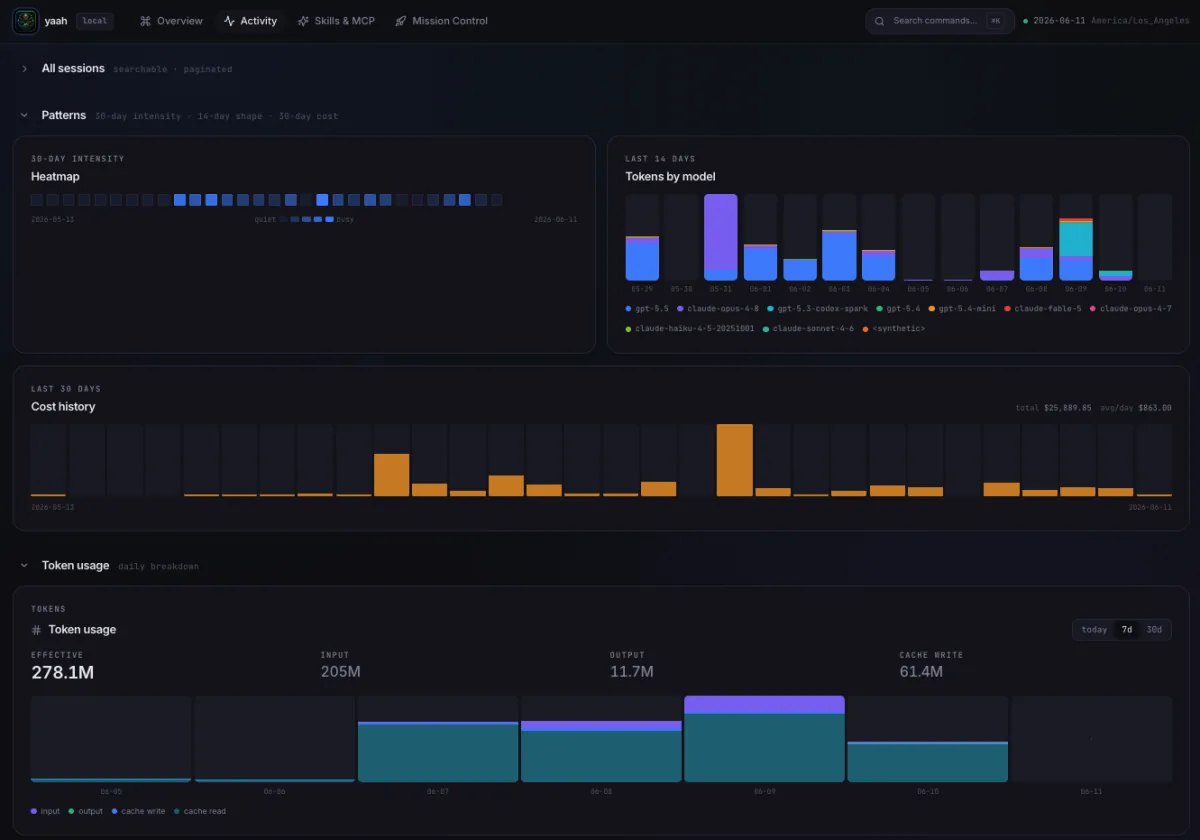
What I wanted Yaah to answer
The first version was driven by questions I kept asking myself:
- Which projects are using AI the most?
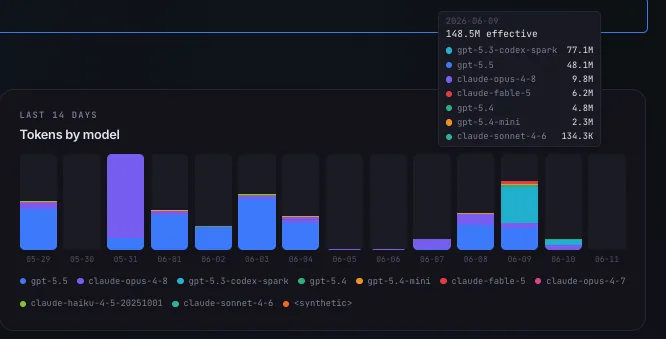
- Which models are getting called?
- How many tokens are going in and out?
- What is the cost trend over time?
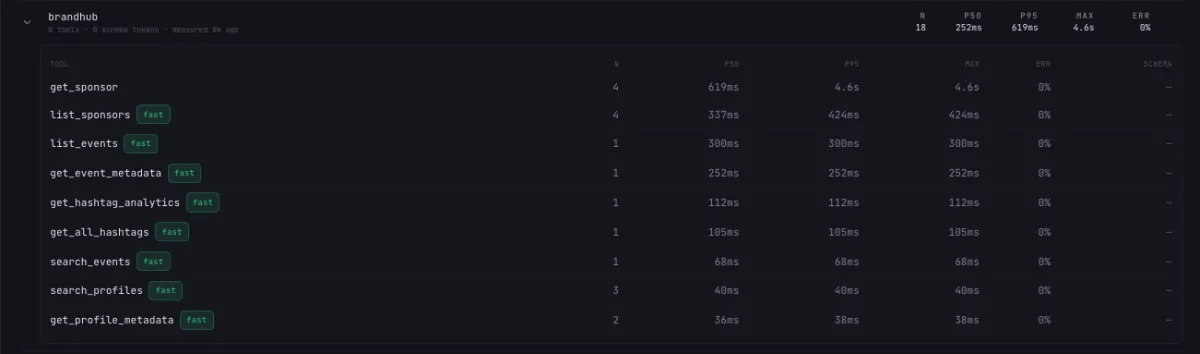
- Which tools are slow, noisy, or failing?
- Which repos are getting a lot of agent attention but not much output?
- Is my usage steady, spiky, or tied to specific projects?
Those are not abstract enterprise governance questions. They are the same questions I ask about any automation I depend on.
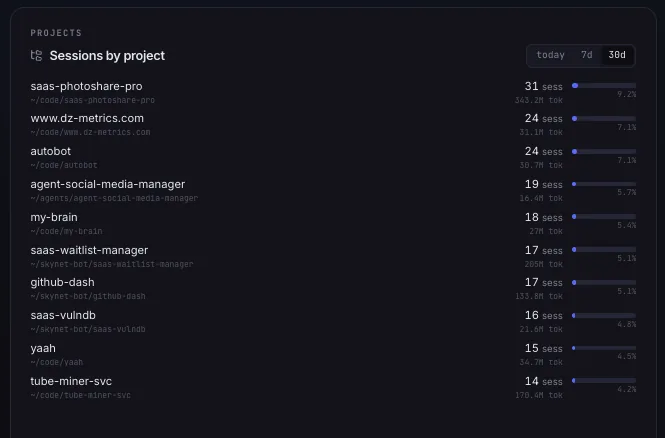
The subscription problem
AI subscriptions are easy to justify when you use them every day. They get fuzzier when usage is uneven.
Some months I am deep in a build and use agents constantly. Other months I only need a handful of repo updates. That makes the value question harder than it looks. Am I getting the most out of a subscription? Should a specific workflow move to usage-based Bedrock calls instead? Which tasks are worth heavier models, and which ones should use something cheaper?

Yaah does not answer all of that automatically, but it gives me the data I need to make the decision. Without that data, I am just going by feel.
Tokens are a signal, not just a bill
Token usage is easy to treat as a cost metric and nothing else. I think it is more useful than that.
High token usage can mean a task was complex. It can also mean the repo context is messy, the issue was unclear, or the agent kept rereading the same files. Low token usage can mean efficiency, or it can mean the agent did not gather enough context.
That is why Yaah tracks token usage next to projects, models, tools, and time. The pattern matters more than any single number.
Tool calls are where the truth leaks out
Agent output can look polished even when the workflow underneath was a mess. Tool telemetry is harder to fake.
If a tool keeps timing out, the agent is going to struggle. If a command gets retried over and over, something about the workflow is wrong. If repo search is slow or failing, the agent’s context is probably weak. If one class of tool call eats most of the time, that is where I should optimize first.
Why this pairs with Autobot
Yaah and Autobot solve opposite sides of the same problem.
Autobot is my serverless AWS Bedrock orchestration pipeline for GitHub issue work. It is where I experiment with using agents to pick up scoped repo tasks, run through a harness, and produce reviewable pull requests.
Yaah is how I see what that usage looks like afterward.
That pairing matters. If Autobot runs a hundred tasks, I do not want to read a hundred transcripts to understand whether it helped. I want to see which projects used it, which models it called, how much it cost, where tools failed, and which patterns are worth improving.
The thing I keep learning
The model is only part of the system.
The real operational work is around the model: context, permissions, queues, retries, cost controls, tests, human review, and telemetry. Yaah exists because I needed a place to see those signals together.
That is also why I do not want to talk about this as generic “AI transformation.” I built a dashboard because I had a practical problem. I was using more AI across more projects and needed to see what was happening.
That is the useful lesson for me: if AI is becoming part of the engineering workflow, it needs the same operational visibility as everything else.
For a broader DevOps/AI operating model, see the intersection of DevOps and AI/ML.
I share more of my DevOps, cloud, AI automation, and project work at jonprice.io.